Safeguarding SAML Assertions with SAML Token Encryption
Continuing on the topic of SAML from last weeks article, another interesting topic worth exploring is SAML Token Encryption. In most cases during an SSO setup or an SSO application migration from one identity provider to another, you likely won't come across a case where token encryption is required. However, without a proper understanding of what it is or how to set it up you may find yourself troubleshooting an issue that has a relatively simple solution.
Quick review of how SAML SSO typically works
It's exactly how it sounds, actually. First, keep in mind that when we deal with SAML we are typically using the term "token" to mean a SAML Response. As a refresher, in a Service Provider initiated flow SAML works as follows:
- A User signs into an application with their username.
- The Application, i.e. Service Provider, will send a request to the SAML endpoint of your Identity Provider and ask the user to authenticate (in Entra, that's usually something like
https://login.microsoftonline.com/{tenantid}/saml2) - Once the User successfully authenticates, the Identity Provider will create a SAML Assertion (i.e. the SAML Token) using the authenticated User's properties and send the Token back to the Service Provider.
- The Service Provider checks the token and then authorizes the user to access the application, assuming the claims present in the SAML token are valid.
One additional option we might reach for when setting up SAML is Assertion and Response Signing. When an Identity Provider such as Entra ID responds to a SAML Request, it can do one of 3 things:
- Sign the SAML Assertion: This cryptographically signs the inner XML that contains the SAML "Token". This means those properties can't be modified but the outer XML could technically be modified by a bad actor.
- Sign the SAML Response: This cryptographically signs the entire document, proventing the entire thing from being modified. 3 .Sign Both the Assertion and Response: This means Entra will sign the Token, or Assertion, first and then proceed to sign the entire Response document, effectively making the entire document relatively immutable.
Okay... and Token Encryption?
Right, sorry. Token Encryption!
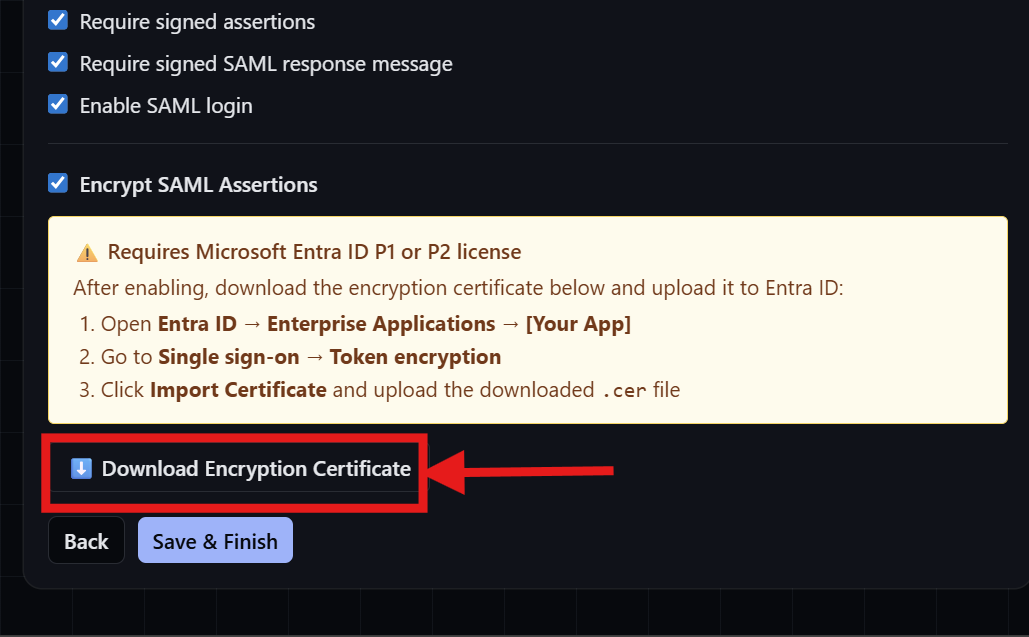
Token Encryption allows the Identity Provider to encrypt a SAML Assertion using a stored Public Key provided by the Service Provider prior to sending the assertion back. If you use SSO Toolkit (another shameless plug), then you can practice this by downloading a public key straight from the SAML configuration wizard:
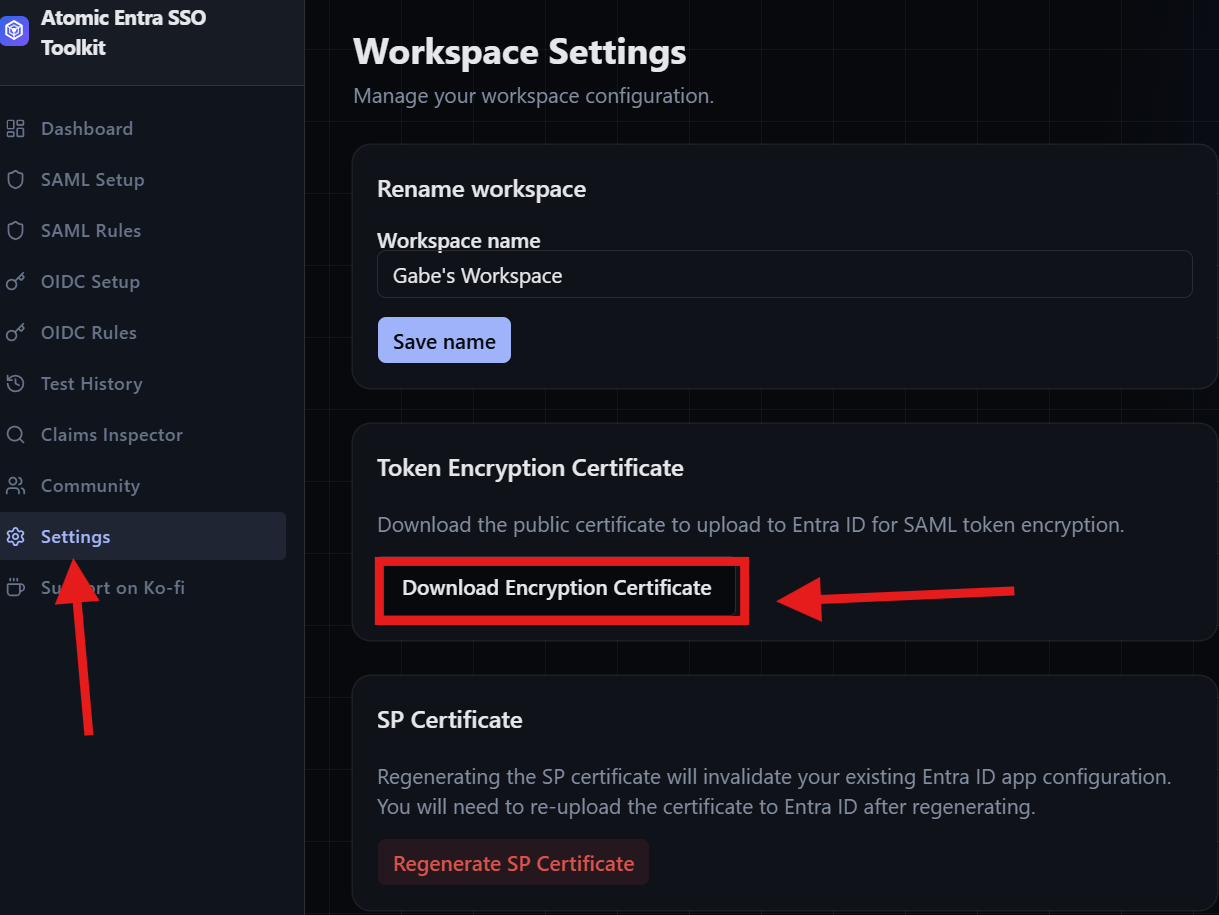
Or in the Settings blade:
In Entra, this public key is stored in the Token Encryption blade of the corresponding Enterprise Application.
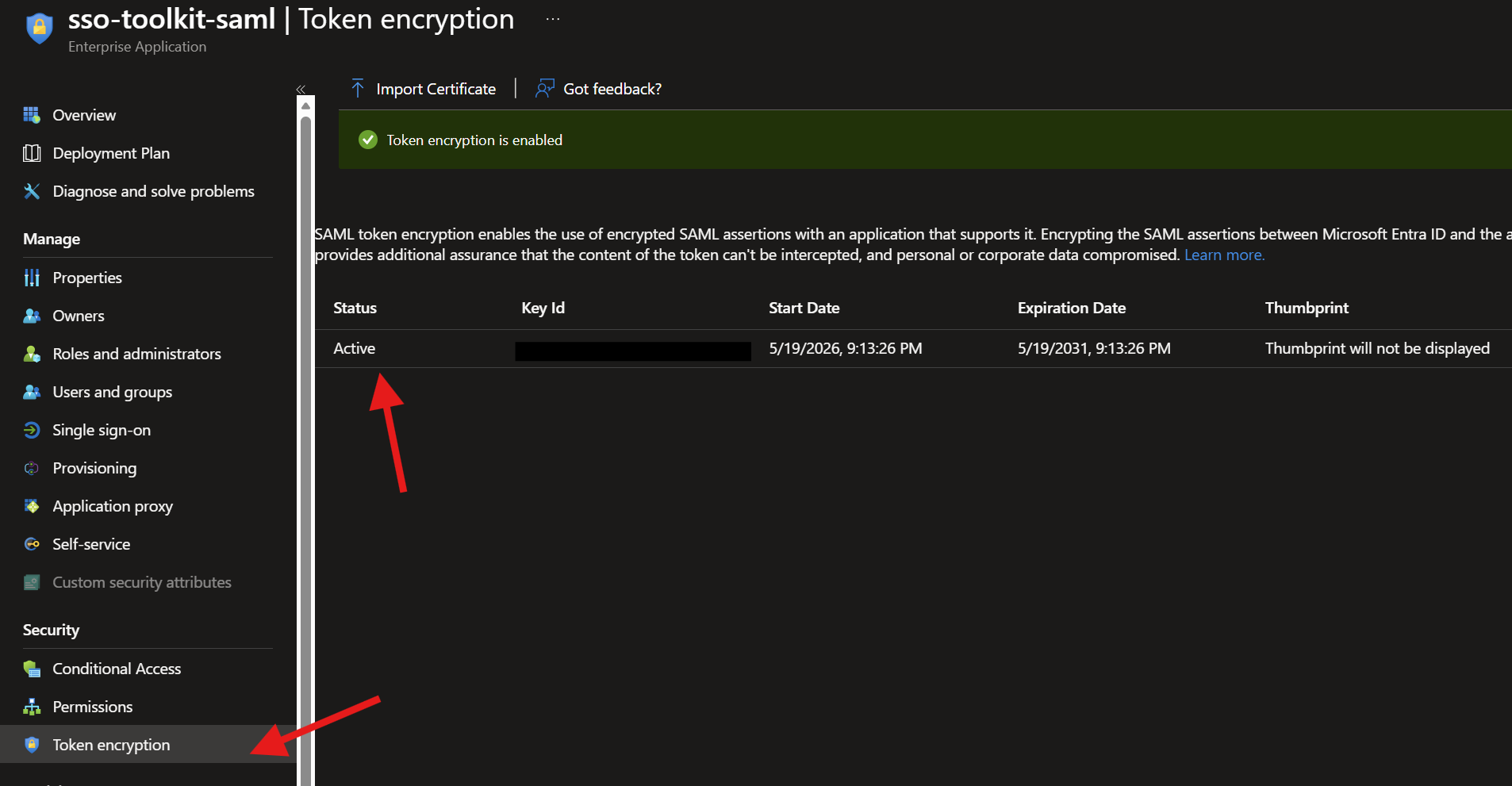
When you're ready to use the key for token encryption, be sure the hit the elipsis on the for right of the uploaded key and hit "Active Token Encryption Certificate". Now going forward, every SAML response will have an encryption SAML assertion that can only be decrypted by the Service Provider's private key.
An encrypted assertion will look something like this:
<EncryptedAssertion xmlns="urn:oasis:names:tc:SAML:2.0:assertion">
    <xenc:EncryptedData Type="http://www.w3.org/2001/04/xmlenc#Element" xmlns:xenc="http://www.w3.org/2001/04/xmlenc#">
      <xenc:EncryptionMethod Algorithm="http://www.w3.org/2001/04/xmlenc#aes256-cbc"//>
      <KeyInfo xmlns="http://www.w3.org/2000/09/xmldsig#">
        <e:EncryptedKey xmlns:e="http://www.w3.org/2001/04/xmlenc#">
          <e:EncryptionMethod Algorithm="http://www.w3.org/2001/04/xmlenc#rsa-oaep-mgf1p">
            <DigestMethod Algorithm="http://www.w3.org/2000/09/xmldsig#sha1"//>
          </e:EncryptionMethod>
          <KeyInfo>
            <o:SecurityTokenReference xmlns:o="http://docs.oasis-open.org/wss/2004/01/oasis-200401-wss-wssecurity-secext-1.0.xsd">
              <X509Data>
                <X509IssuerSerial>
                  <X509IssuerName>O=Atomic Entra, CN=SSO Toolkit Encryption</X509IssuerName>
                  <X509SerialNumber>[Certificate Serial Number]</X509SerialNumber>
                </X509IssuerSerial>
              </X509Data>
            </o:SecurityTokenReference>
          </KeyInfo>
          <e:CipherData>
            <e:CipherValue>Pux...</e:CipherValue>
          </e:CipherData>
        </e:EncryptedKey>
      </KeyInfo>
      <xenc:CipherData>
        <xenc:CipherValue>Mcwaw...[this will  be very long</xenc:CipherValue>
      </xenc:CipherData>
    </xenc:EncryptedData>
  </EncryptedAssertion>
A few things to note in the Encrypted Assertion:
<KeyInfo>- This has a ton of information nested inside, such as the method of encryption, the X509 issuer details (i.e. the Service Principals public key), the serial number of the X509 Public Key that was used, and some CipherData (more on that shortly)<xenc:CipherData>- This is your actual encrypted SAML Assertion, or token, data. This incredibly long strong of random characters contains all the assertion data you are sending back to the Service Provider, and has gone through quite the little hand-off to get to this point.
So how does the encryption happen?
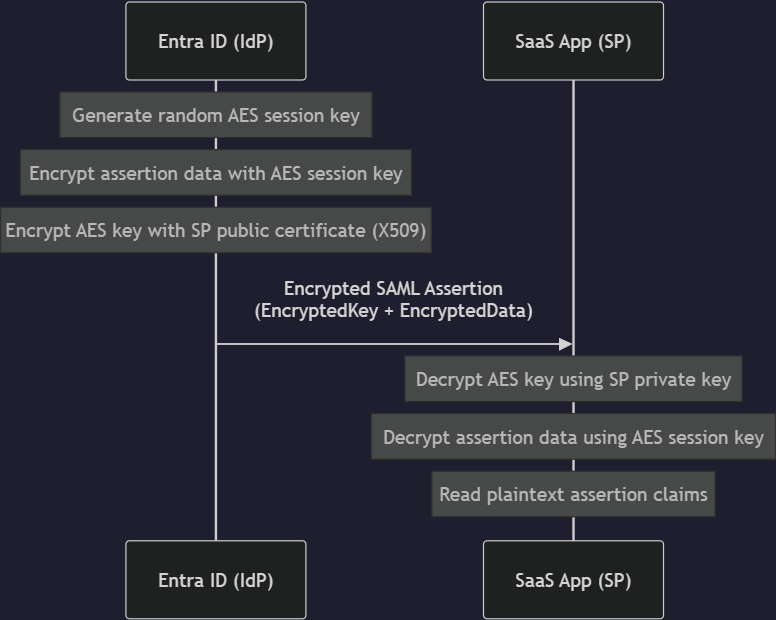
This is where things get interesting. Based on my understanding, Entra doesn't encrypt the assertion data using the Public Key provided by the Service Provider. Instead, the process follows a structure loosely as follows:
- Entra creates a random symmetric AES key when it gets the SAML request.
- Entra uses that symmetric key to encrypt the SAML Assertion data in the SAML Resopnse.
- Entra then encrypts the symmetric key using the Public Key you stored.
To try and use a metaphor on this, look at this way (feel free to skip to here):
Imagine we want to send secret messages to each other. If this were the good ole days, maybe we'd use something like a Caeser Cipher. The problem with a substitution cipher like Caeser is that it's symmetric. You and me both have to know the same algorithm to decrypt the message. That also means that if someone intercepts one of us and steals that information, they can read all our messages!
To counter this, you get an idea. You tell me to send you a box with a lock on it that only I have the key to. Then when you send me your next message, you pick a random caeser cipher to encrypt our message. Knowing I won't have the key, you place a written version of it inside a second box and lock it up with the lock I sent you. Now you've encrypted the message using a new symmetric key, but you've also "encrypted" the key to the cipher, securing it in transit to me. Now if it's stolen, it won't really matter as someone technically can't read the message, and they can't get into the box with the cipher key without my key to the lock.
Ignoring the fact that Caeser Ciphers are super simplistic, this is a pretty good strategy since we can use a simpler symmetric key to encrypt the actual data, and then use asymmetric keys to encrypt our symmetric key. This is a far less time intensive operation!
Enough metaphors, draw a picture!
Here is a simple diagram that explains how this works:
Nice! When should we use this
There are a few obvious use cases where SAML Token Encryption make be particularly useful:
- Regulated Environments: Organizations that are under heavy regulatory compliance requirements may need to ensure there is end-to-end encryption to SaaS applications that are a part of their regulated footprint. While most encryption reguirements are concerned with Data-at-Rest and Data-in-Transit (and I mean actual data), ensuring you can encrypt SAML assertions may add an extra level of assurance that compliance is being met.
- Mitigating Data Exposure: If your organization deploys a 3rd party PAM solution (like Delinea or CyberArk), your threat model might include details about preventing the exposure of information about users during a SAML exchange. In a AiTM attack, a threat actor may be trying to identify who has access to these applications. By encrypting to assertion, you add an extra layer of protection around who is authenticating to the application and details about that user.
A few additional notes:
- Microsoft Entra, by default, does not allow SSO without HTTPS. This ensures that SAML responses are never truly sent in the clear. The addition of Token Encryption just further protects the assertion data.
- Token Encryption does NOT prevent Golden or Silver SAML attacks. Entra itself isn't susceptible to Golden SAML in its original form as you can't export the Private keys used to sign your SAML Responses and Assertions. That said, Silver SAML is still a possibility as organizations can upload their own SAML signing certificates. If an attacker were to get ahold of the private key of an uploaded signing cert, they could technically accomplish the same feat as a Golden SAML attack.
The End
That's the gist of SAML Token Encryption. I hope you found this deeper dive useful to furthering your understanding of how SAML token encryption works and how it can be leveraged. Feel free to test it out over at https://ssotoolkit.atomicentra.com.
See you in the next one!